New Payment Process LAUNCHED!

✳︎

New Payment Process LAUNCHED! ✳︎


New improvements to our online payment process…

ESTF Scholarship Recipient? Click the button for info!

LMA students reading books.
with more to come!

We are pleased to be debuting improvements to our billing and online payment experience, beginning in June 2026.

Scroll down to learn more!

Invoices emailed directly to you—no more “add to cart” work for you!

You will now receive both a paper invoice via regular mail and an emailed invoice with a direct link to pay your exact amount owed for tuition and related charges each month. We no longer have a cart-based system for tuition and monthly expenses. You will be emailed according to a set schedule, so you always know when and where to expect your bill and how much it is…no more guessing or accidentally adding the wrong item to cart!

What’s changed:

Lower online processing fees—with future reduced rates to come.

We’ve lowered our online payment processing fees, which means we are passing those savings on to you. Paying by card will no longer cost as much as it has in the past, hopefully making it more feasible for you to pay this way.* We also plan to continue negotiating lower rates with our provider(s) until we can offer no-cost processing. We value your time and want you to know that we are working to prioritize your convenience by making payments as seamless as possible for you.

Bank transfer (ACH) available: most cost-effective online pay option yet.

We are now accepting bank transfers (ACH payments) for invoices paid online. We highly encourage you to choose this payment option. The bank transfer charge is 1%, which is the lowest processing fee we’ve ever been able to offer for online transactions.* As with the processing fees for card payments, we hope to soon be able to offer this payment option without any additional cost to you. We will provide detailed instructions very soon to help you enable this payment option.


If you would like to change your billing preferences to pay in full (either by card, cash, or check), please fill out this brief form. Due to the high volume of calls and direct emails we have received, we ask that you please fill out this form as it will help us better manage your requests as quickly and efficiently as possible.

*Please note:

1. Laurence Manning’s policy is that all families receive both a monthly statement AND an emailed invoice until the account balance has been paid for the year. This is our standing policy and will not change.

2. We do not accept card payments in the office or over the phone. If you intend to pay by card, you must do so via the pay link provided in your email. You are always welcome to come by and discuss your account if you have questions or concerns, but all card or bank transfer payments will be made via payment link only.


*All online transactions will be initially processed with a 2.3% surcharge added (our new card processing rate). If you enable the bank transfer option instead of paying by card, we will adjust your invoice to reflect the correct 1% surcharge for bank transfers and issue you a refund for the over-charged amount. We encourage you to save your payment method on file for auto-pay (regardless of whether you choose to pay by card or via transfer) so that the amount charged to you is consistent month-to-month.

What you need to know:

Beginning in June, all families will receive a paper statement/invoice via regular USPS mail AND an emailed invoice. Emailed invoices will have a direct “Pay Invoice” button. Clicking on that button will take you to our payment portal and give you your choice of online payment options. See below for detailed steps on how to pay via various methods.

You always have the option to pay by cash or check. Please mail payments (P. O. Box 278 | Manning, SC 29102) or drop them off at the front office of our high school building. Make sure your payment is clearly labeled with your name, your student's name, and the purpose of the payment.

We hope to streamline our online payment processing further (e.g., to include lunch and/or other payments you make to LMA) prior to the start of the 2026-2027 academic year. We will provide details of any additional changes closer to August. If we are unable to implement changes before the new year begins, please know that we are working diligently to improve your online pay experience and intend to provide new solutions as soon as possible.

Disclaimer: We are still working to implement these changes as effectively as possible. Because June is our first month operating under our new terms, we anticipate some hiccups. We appreciate your patience as we continue to work through challenges that arise.

VERY IMPORTANT:

All “subscription” / “membership” plans set to auto-charge cards will be turned off prior to 11:59 PM on June 5, 2026.

Please note that all payments automatically charged to cards from June 1- June 5, 2026, were charged 2025-2026 prices. As such…

FULL REFUNDS for cards charged between June 1 and June 5 will be issued by June 6, 2026. Refunds can take several days before they show up in your account. If you have not received your refund after 7 days (June 13, 2026), please contact us.


Step-by-Step Instructions:

For assistance with online payment transactions, please review the step-by-step instructions below. These include the steps to take to enable your bank transfer payments if you wish to do so. If you need assistance after reviewing the instructions, please contact us. Want to change your billing preferences? Let us know here.

Please note: Any prices shown in the images below are not accurate and should not be taken to represent the actual prices paid for tuition or other services. The amounts shown in pictures are used for demonstration purposes only.
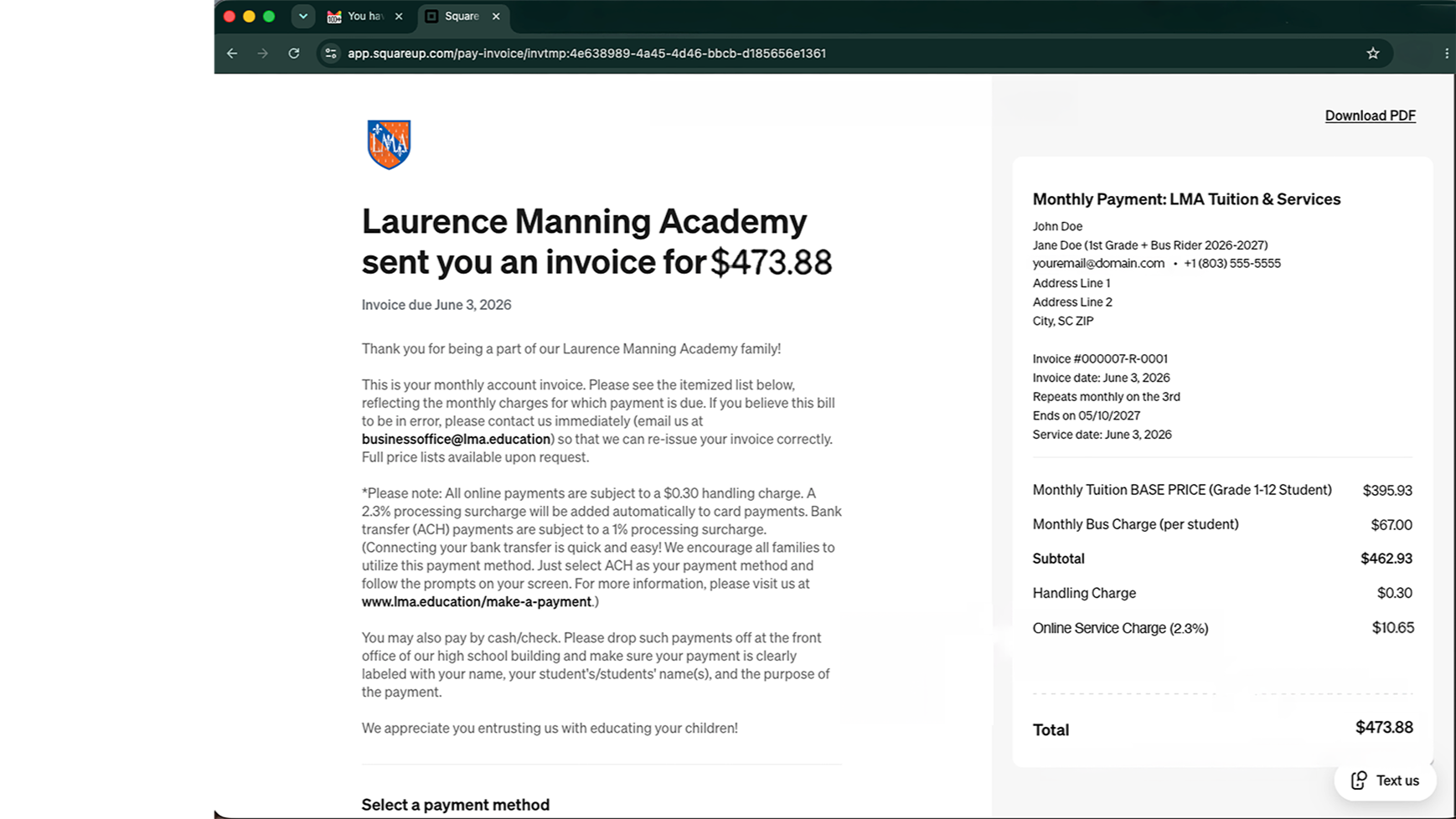
  • 01. Receive invoice.

    Your invoice will be emailed to the email address we have on file on or before the 10th of each month. When you click the “Pay Invoice” button linked in your email, your invoice will open in a separate window as depicted here.

    A 2.3% Online Service Charge will be applied to your invoice, pursuant to our online payment processing terms. Upon receiving your payment, we will refund any bank transfer transactions the 1.3% over charge—to correspond with the 1% transfer fee terms. Card transactions will not be refunded.

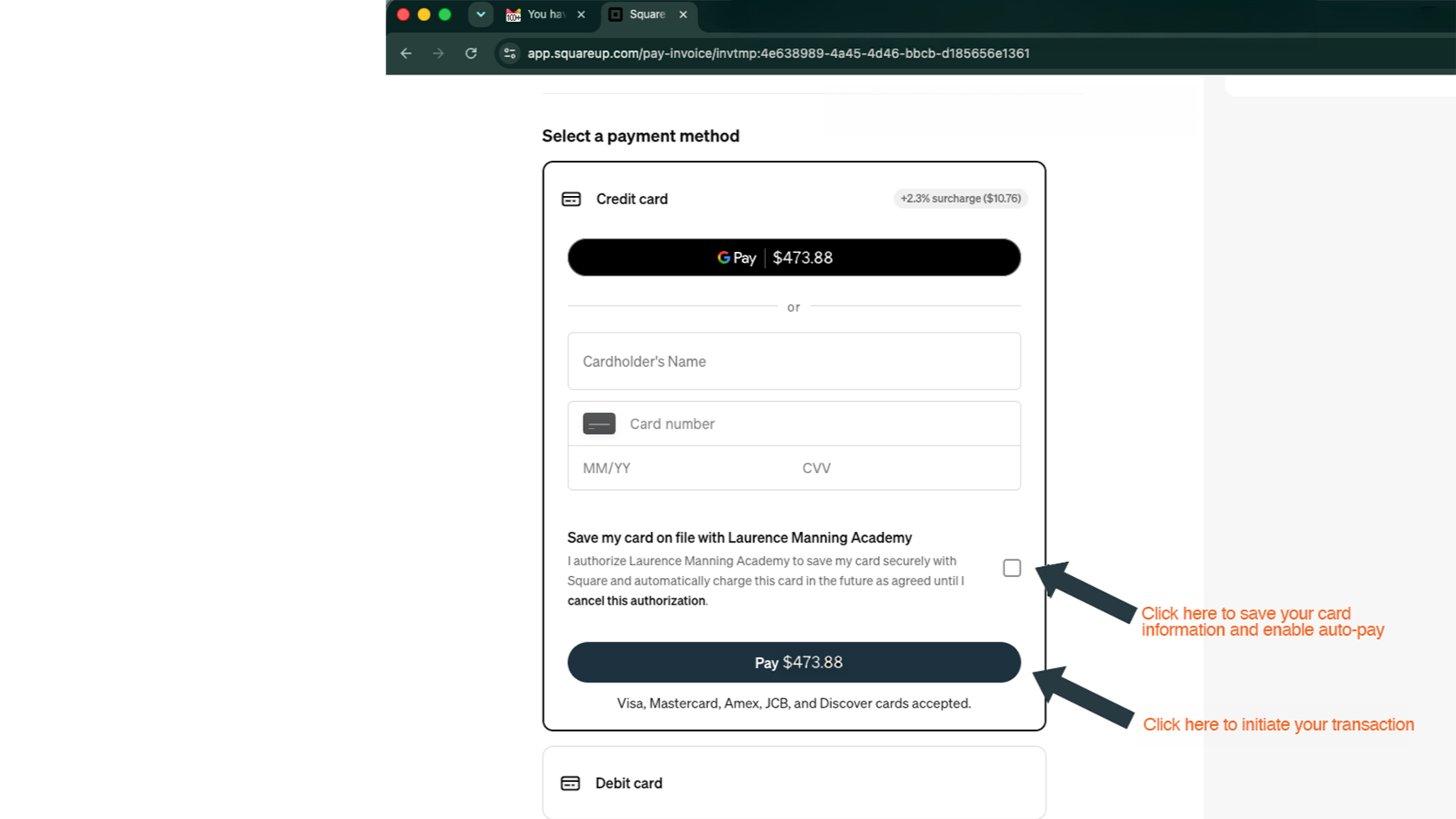
  • 02. Select your payment method: Card option.

    Select the online payment method of your choice. Credit card is the first option. To pay by card, enter your details and click the Pay button. If you’d like to save your card on file to auto-pay your invoice each month, click the check box by “Save my card….”

    Saved cards will be automatically charged on the invoice date of each month.

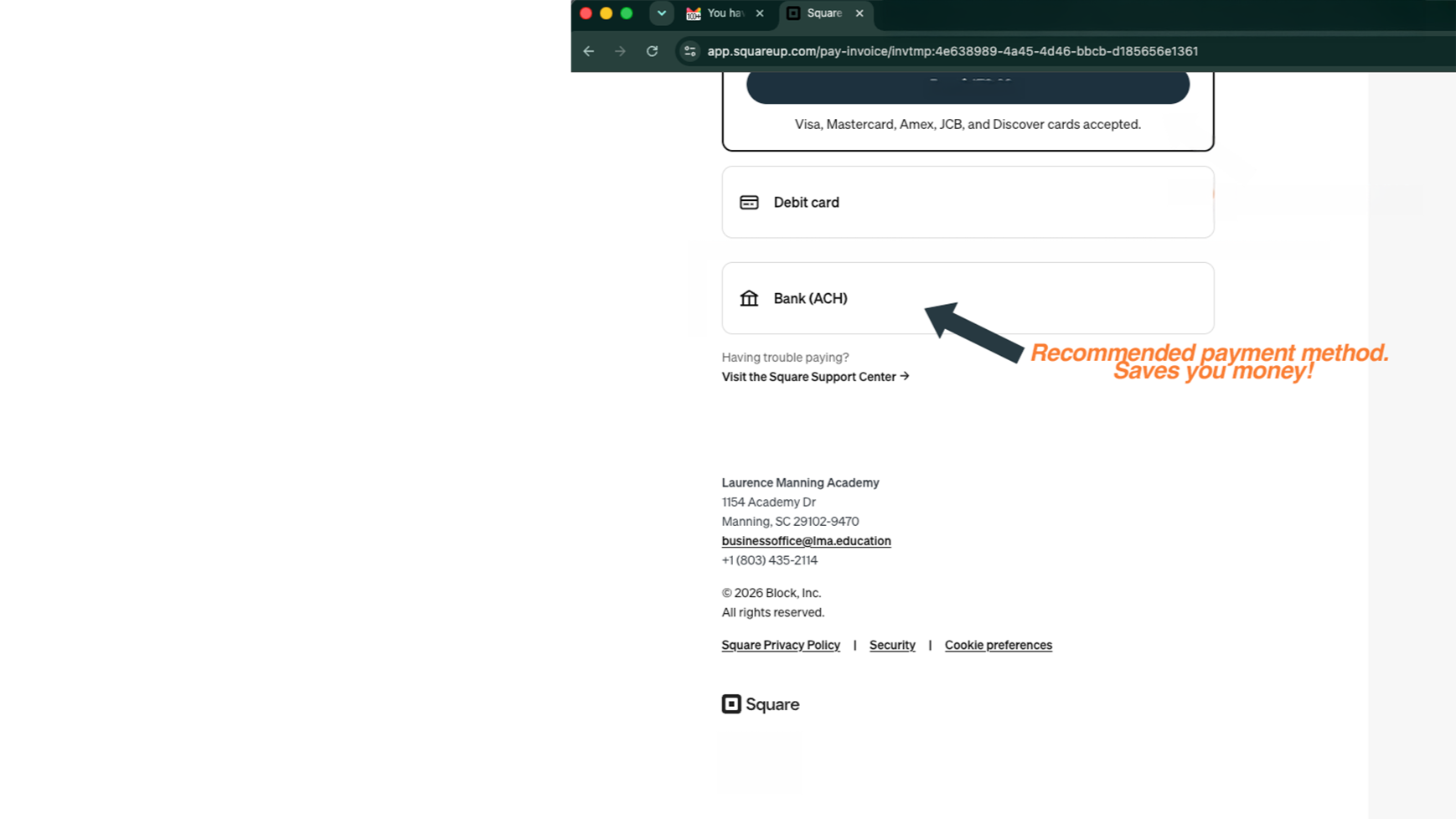
  • 03. Select your payment method: Bank transfer (ACH) option.

    We now accept bank transfer (ACH) payments on your monthly invoice. We highly encourage you to enable this payment method as the service charge for bank transfer payments is 1% (v.s. the 2.3% charged to card payments).

    Enabling bank transfer is quick and easy! The subsequent steps depict how to proceed with this payment option. Connecting your bank to Square can be done in less than 90 seconds!

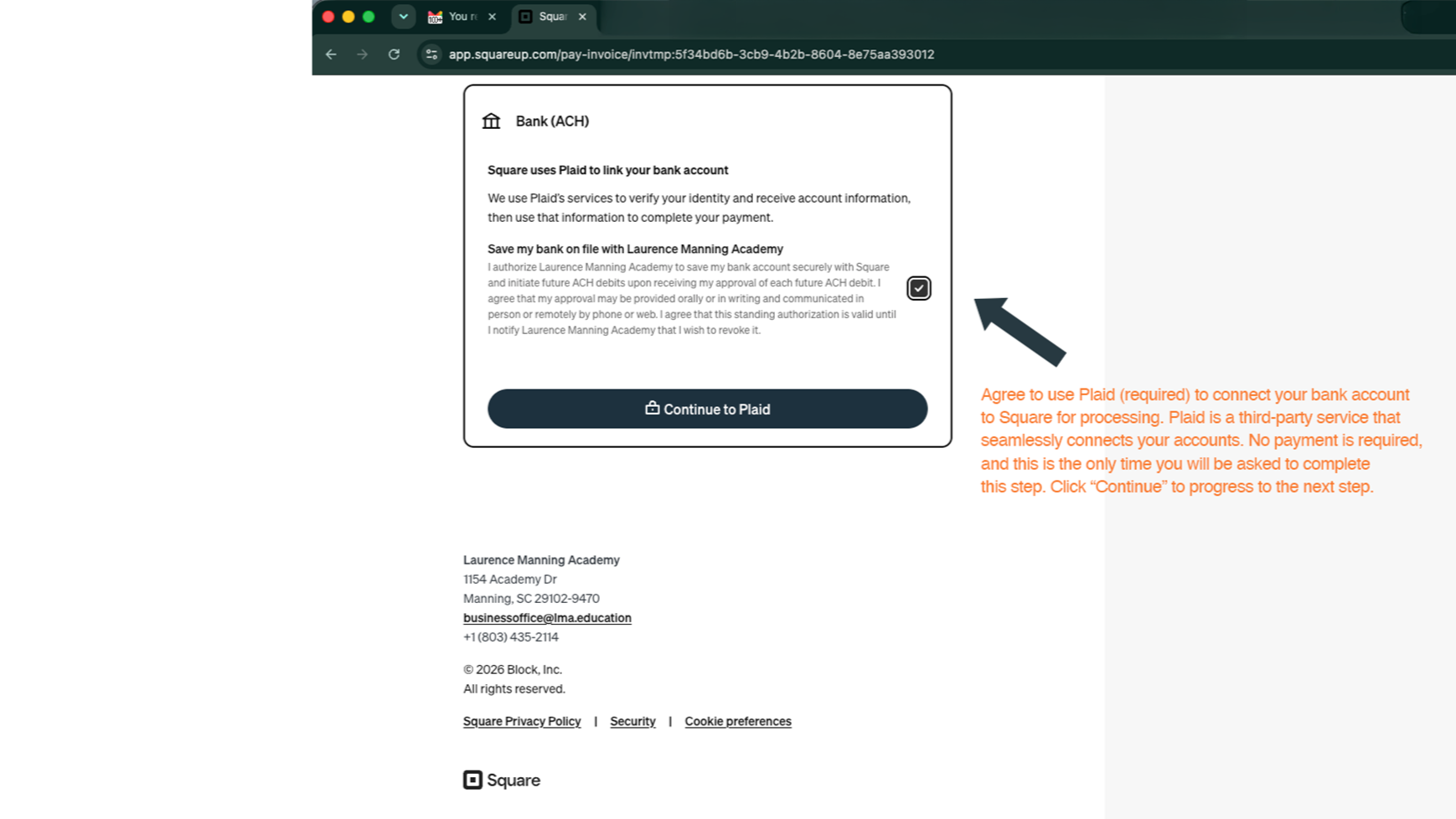
  • 04. Enable auto-pay for bank transfer.

    We also encourage you to enable the “Save my bank on file…” auto-pay option. Click “Continue to Plaid” to initiate your bank transfer.

    For auto-pay enabled accounts PAYING VIA BANK TRANSFER, we will adjust your invoice’s Online Service Charge to correspond to the correct processing fee (1%) before the next billing cycle. If you do not enable auto-pay and opt to pay via bank transfer, you will be charged the 2.3% initially and will have to wait for a refund on the over-charge.

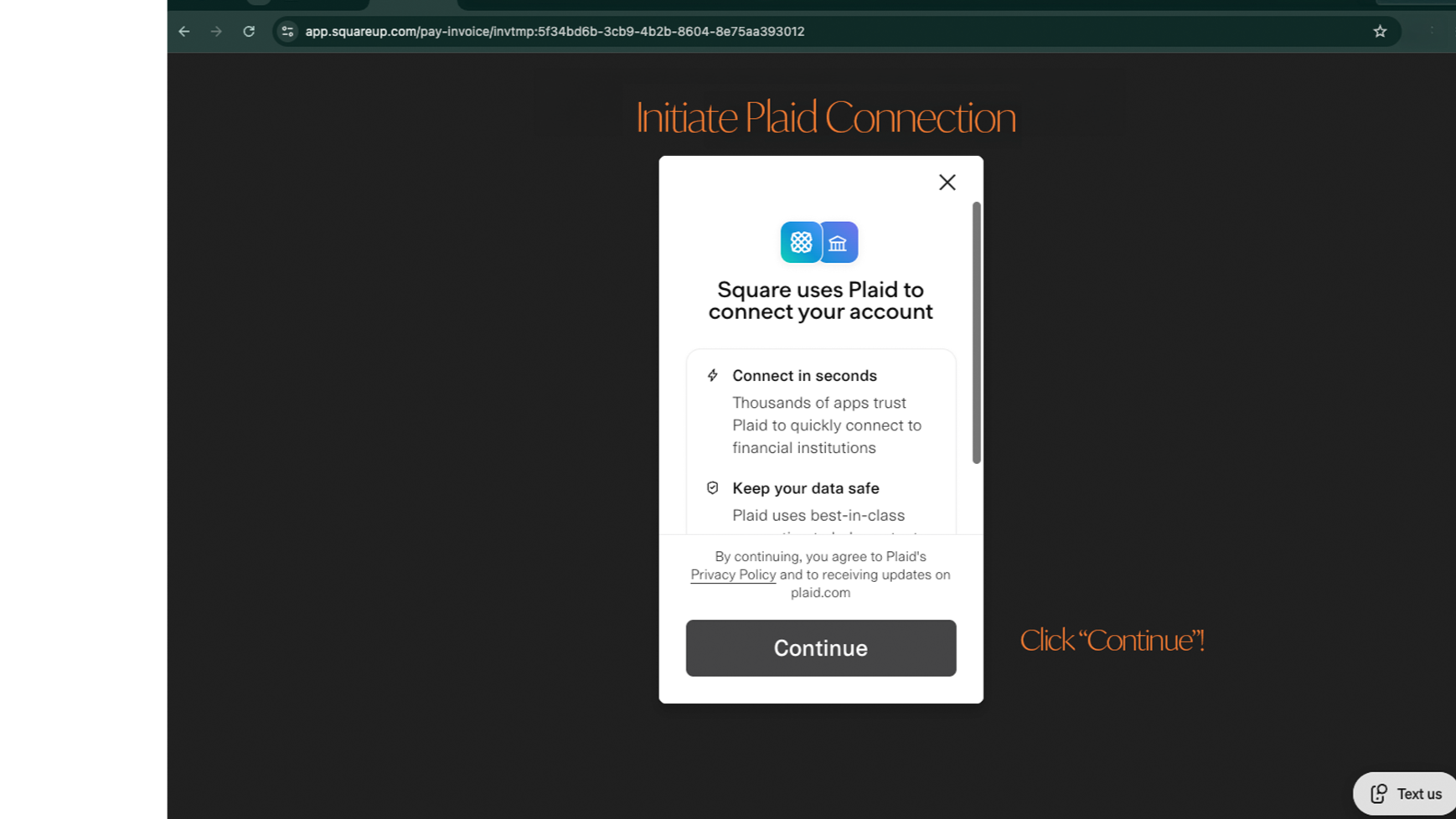
  • 05. Initiate bank-to-Square connection.

    Agree to use Plaid (required) to connect your bank account to Square for processing. Plaid is a third-party service that seamlessly connects your accounts. No payment is required, and this is the only time you will be asked to complete this step. Click "Continue" to progress to the next step.

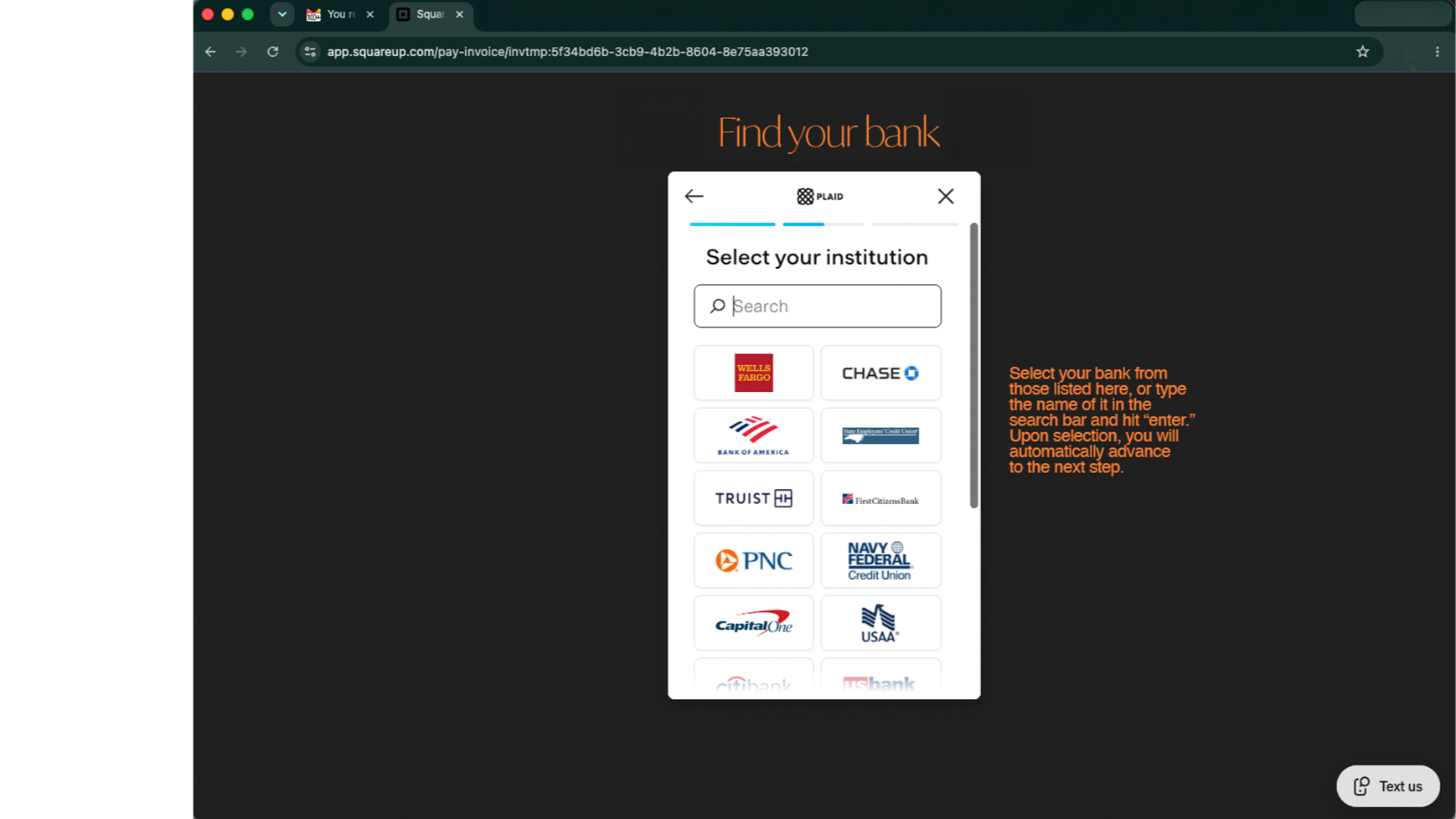
  • 06. Select your bank.

    Select your bank from those listed on your screen, or type the name of it in the search bar and hit "enter." Upon selection, you will automatically advance to the next step.

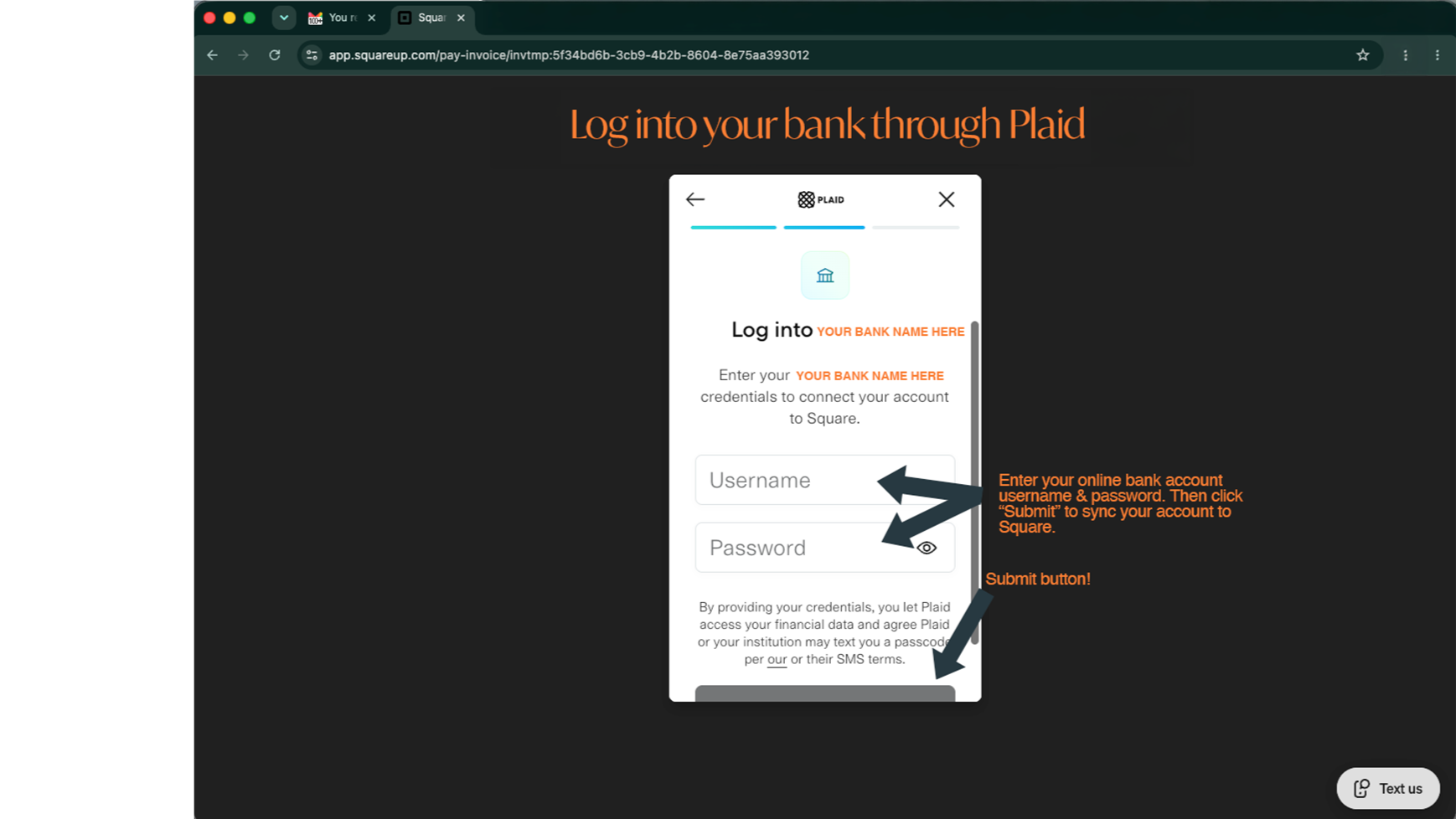
  • 07. Log into your account

    Enter your online bank account username & password. Then click "Submit" to sync your account to Square.

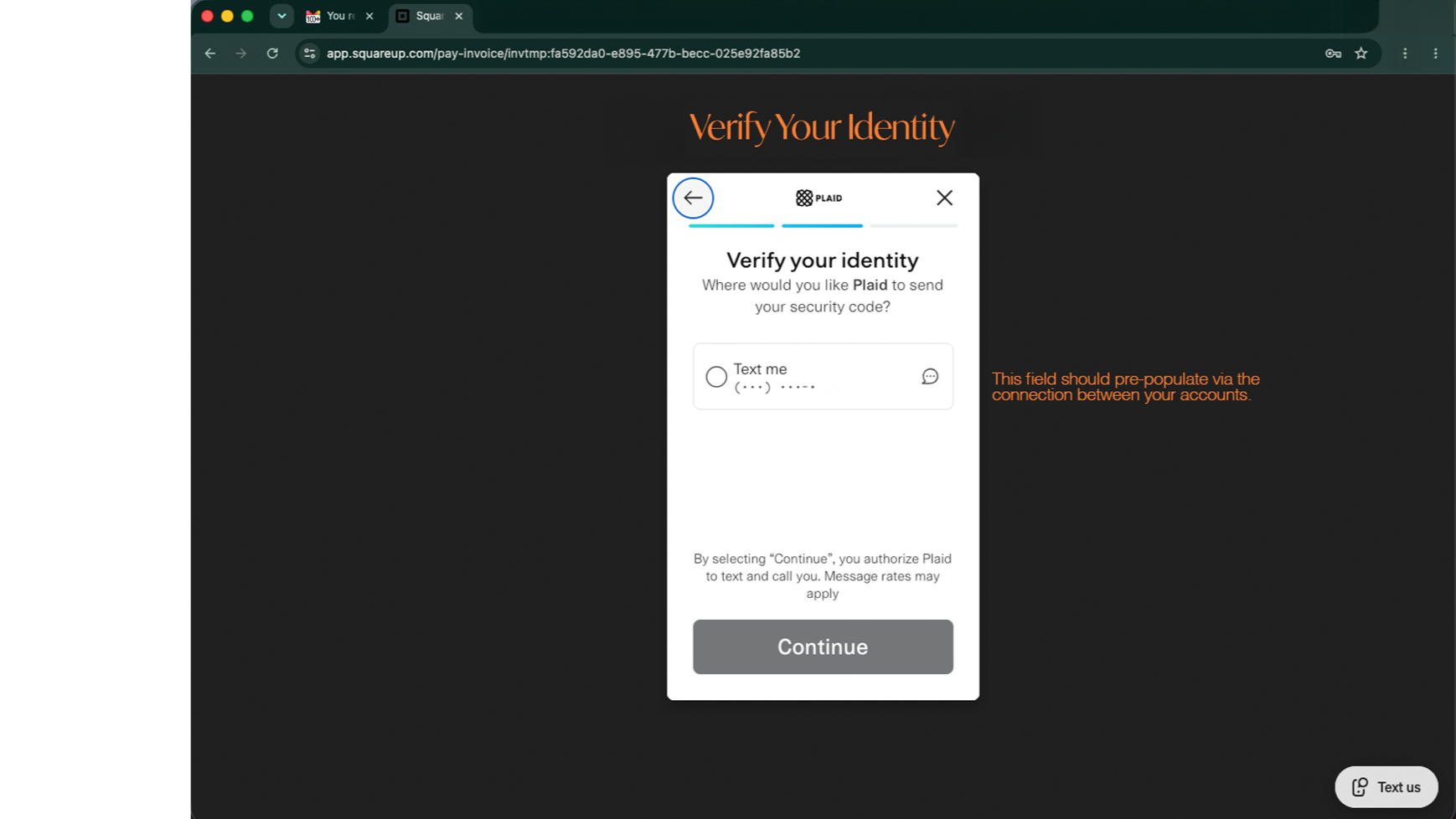
  • 08. Verify your identity.

    Identity verification methods should pre-populate for you. Choose the method that is most convenient and click “Continue.”

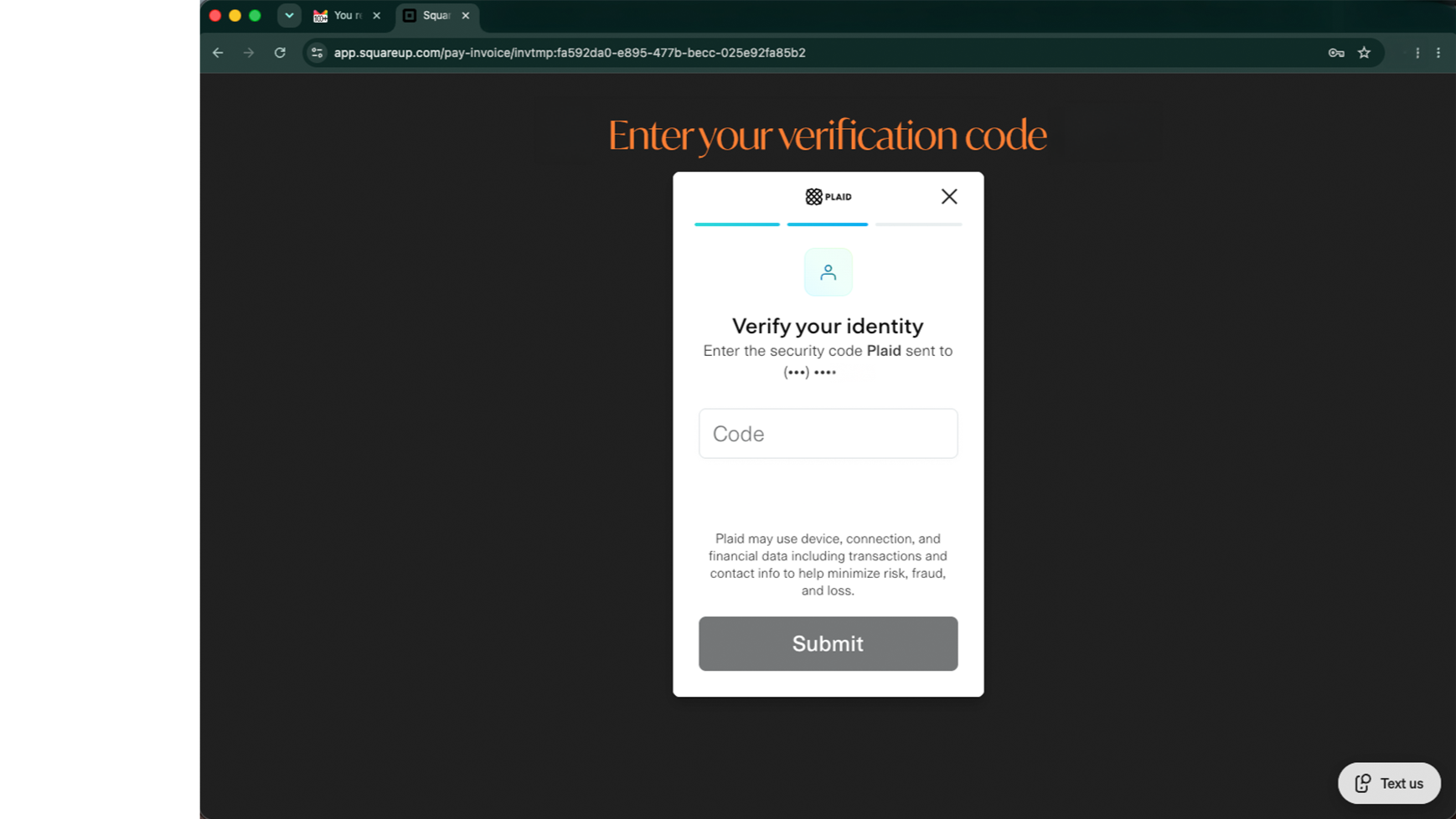
  • 09. Enter your verification code.

    You should receive your verification code right away. If you use your email account to verify, don’t forget to check your spam folder for your code, especially if receiving it seems to be taking too long!

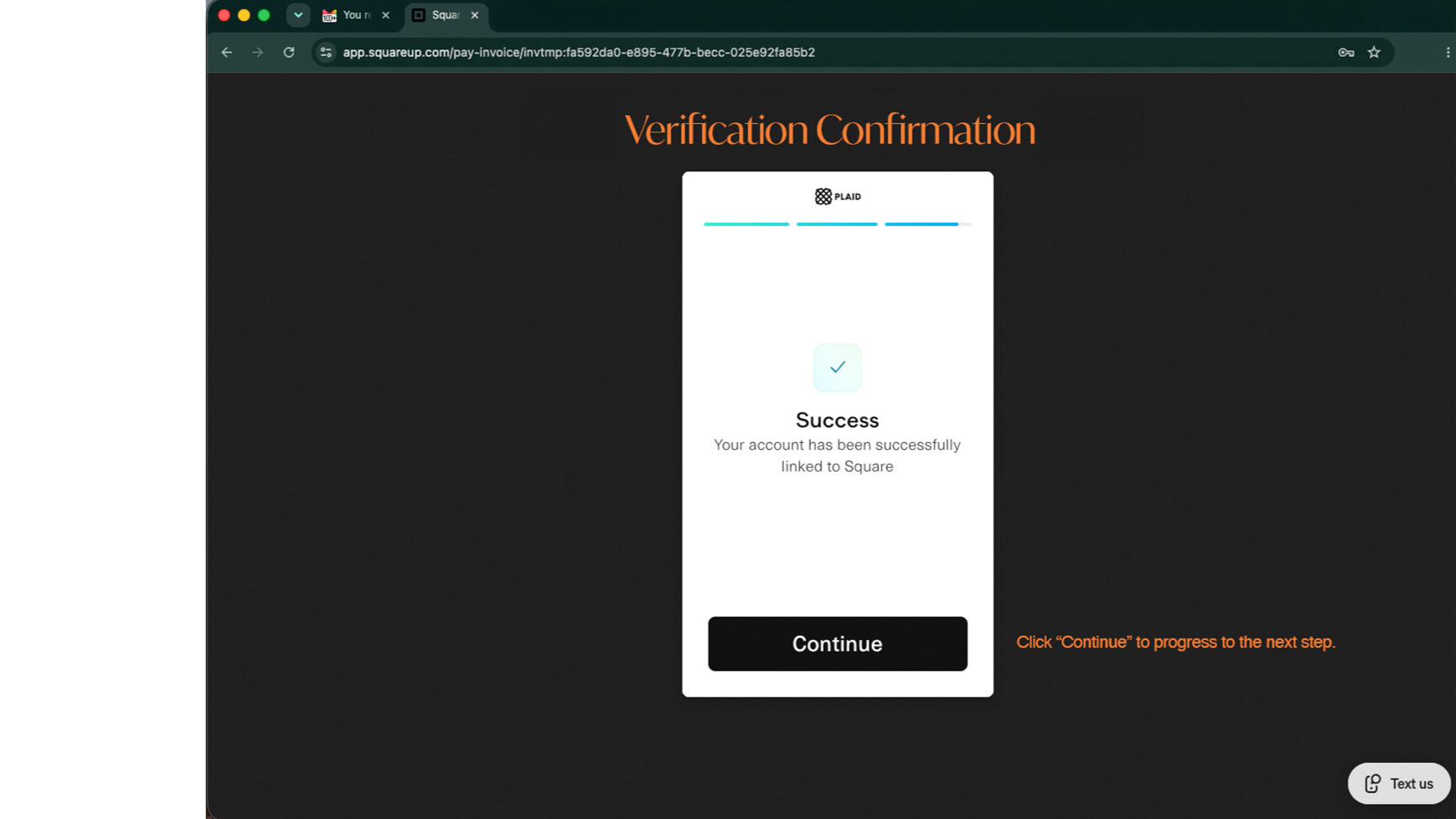
  • 10. You're almost there!

    You’ve connected your accounts—click “Continue” to progress to the next step.

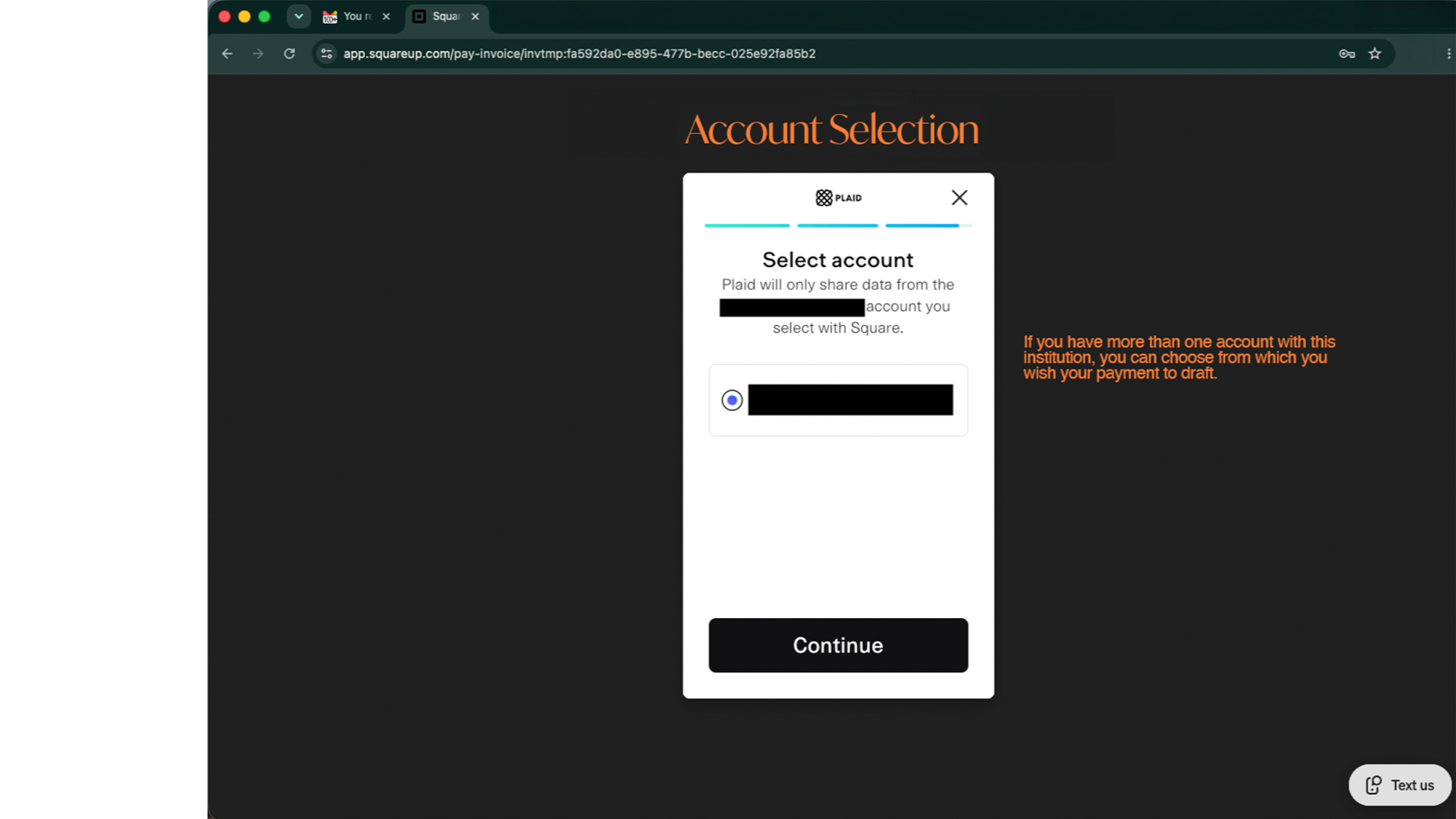
  • 11. Select the account from which you want to draft your payment.

    If you have more than one account with your financial institution, you can choose the one from which you want to draft your payment. Click “Continue”!

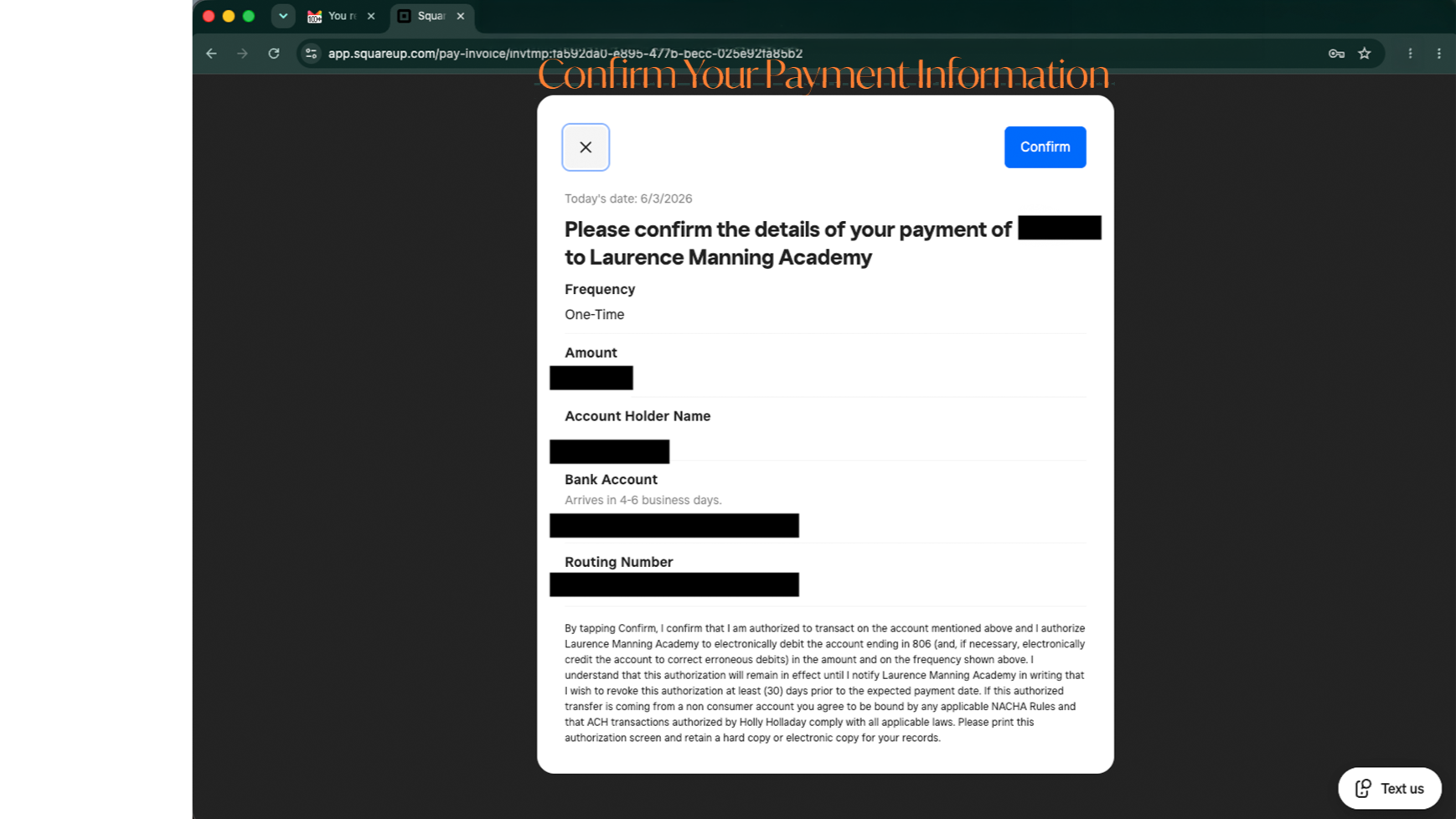
  • 12. Confirm your details.

    Confirm that you wish to draft the specified amount from the account information listed to pay your outstanding invoice.

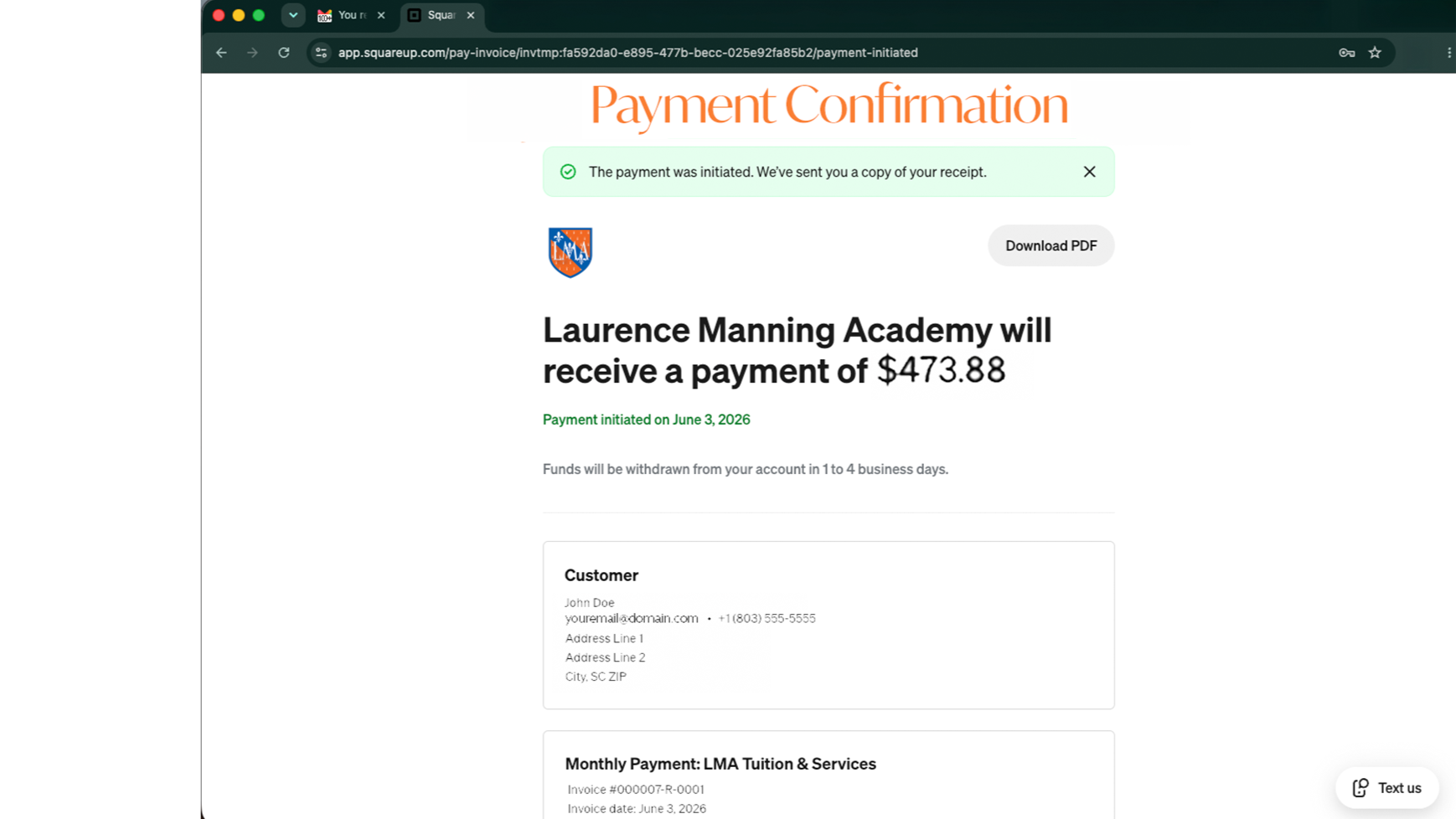
  • 13. Payment confirmation.

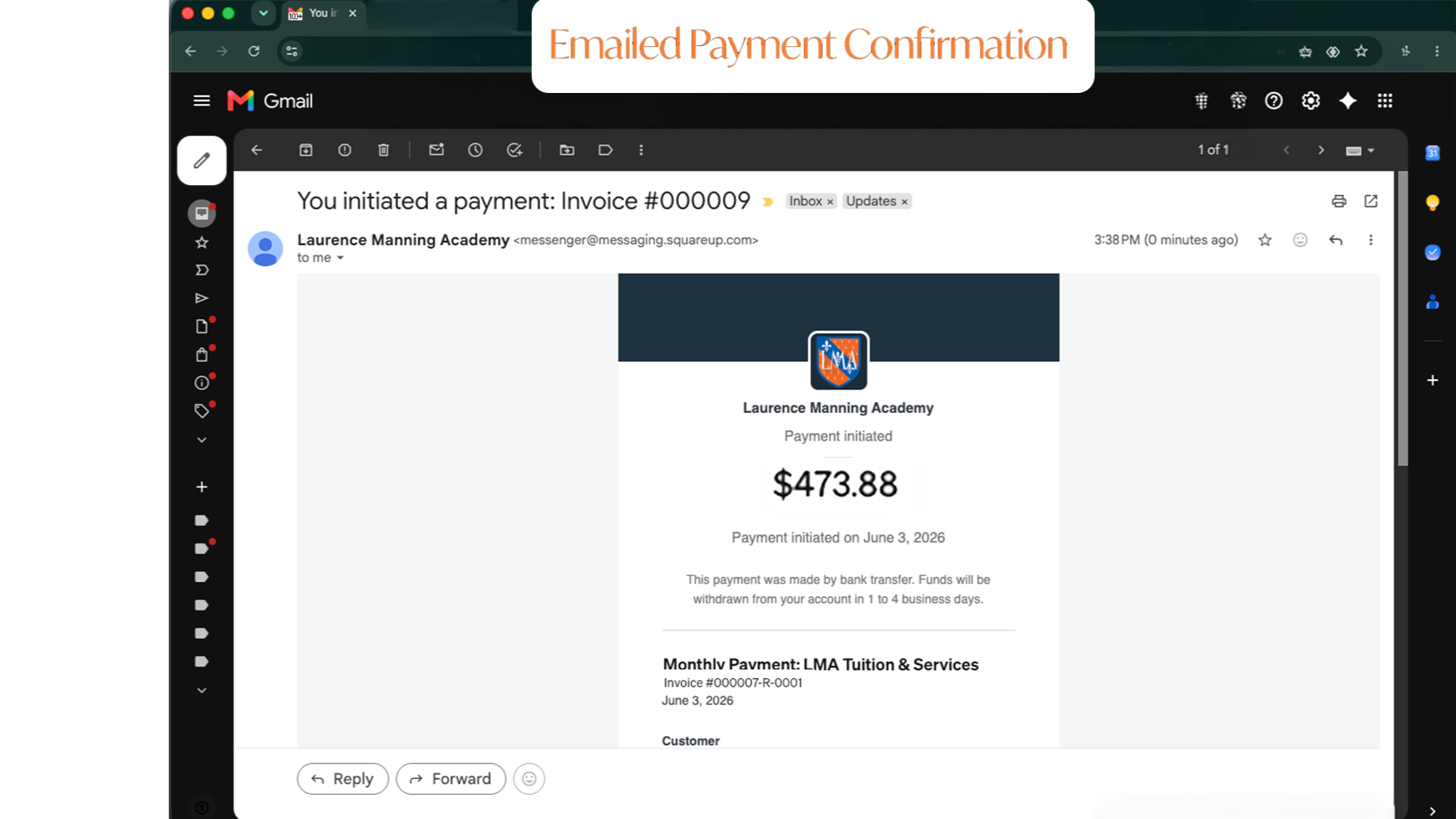
    Upon your successfully completed transaction, your payment confirmation details will appear on your screen. Take a screenshot, save as a pdf, or print if you wish to keep a copy for your records. You’ll also receive a confirmation email…

  • 14. ...like this!

    Check your email for your confirmation. Remember to check your spam if it doesn’t arrive in a timely fashion!

    __________________

    If you chose to save your information on file to auto-pay your subsequent invoices, then you are all set! The automatic transaction will occur each month on the specified date.

    Have questions or need assistance? Email us for help!

Billing & Payment FAQs

We bill for tuition and other required expenses monthly, from June to May, for each academic year. For the 2026-2027 school year, you will be billed the cost of attendance for beginning in June 2026 and culminating in May 2027. Prices for the next year will begin in June 2028.

Monthly payments are due on the 10th of each month. If you wish to pay the cost of attendance for the year in one payment, you must do so before August 10.

How often am I billed?

When is my payment due?

1


How much does it cost to attend?

Do you offer any discounts?

2

The cost of attendance varies based on the number of children in attendance and the grade in which they are enrolled. Current families are provided the cost of attendance prior to our re-enrollment window each year. New families receive price lists in their interest packets when they complete their campus tour (required prior to submitting an application).

We offer a multi-student discount for families with 3 or more children in grades 1-12. We also offer a “paid-in-full” discount (5% off the cost of tuition only) for people who choose to pay the cost of attendance in full before the academic year begins (by August 10th each year).


What’s the best way to pay?

You may pay by cash or check by mailing payments to our post office box address (P. O. Box 278 | Manning, SC 29102) or by dropping your payment off at our front office.

You may pay by card or bank transfer online through your direct payment link on your electronic invoice. Our policy is that all families are mailed a hard copy statement via USPS each month, as well as an online invoice with a direct payment link.

Please note: We do NOT accept card payments via phone. If you wish to pay your bill in person using a card, you will still be required to use the payment link provided in your emailed invoice. Outstanding balances will also be paid via payment link. We do not manually process these transactions in the business office.

3


Why do you charge me a fee to pay online?

What do I do if I am having issues paying online?

4

Credit card companies charge businesses each time they process a card payment, so we get charged each time you use a card to pay your bill. Because we strive to keep our tuition costs as low as possible, we don’t include card processing in our overhead costs like many other companies do. Instead, we give you the option to pay the lowest price possible via cash or check.

Unlike companies that hide their card fees within their “regular” price hikes, we want to be transparent with you about where your money goes. Therefore, we haven’t hidden these costs from you. Instead, we have negotiated better rates with our service partners and shouldered some of the burden so that it doesn’t all fall on you! We are pleased to be offering the lowest rates we’ve ever offered for card processing to families this year AND to now give you the option of even lower surcharges with bank transfer payments. Our goal is to get to a place where you aren’t responsible for processing fees on any transactions—regardless of how you choose to pay!—so please know that we are continuing to do everything we can to lower costs for you.

If you experience issues when attempting to pay online or have questions about how to do so, please review the step-by-step instructions provided above or email us for assistance.